Rainbow Six Siege/X: Toshi Internal – Advanced Aimbot, ESP, Radar & Customisation
Toshi Internal for Rainbow Six Siege/X is a feature-rich internal solution built around precise targeting, detailed visual information, custom HUD tools, and extensive configuration options. It supports Windows 10 and 11 and is compatible with both Intel and AMD systems.
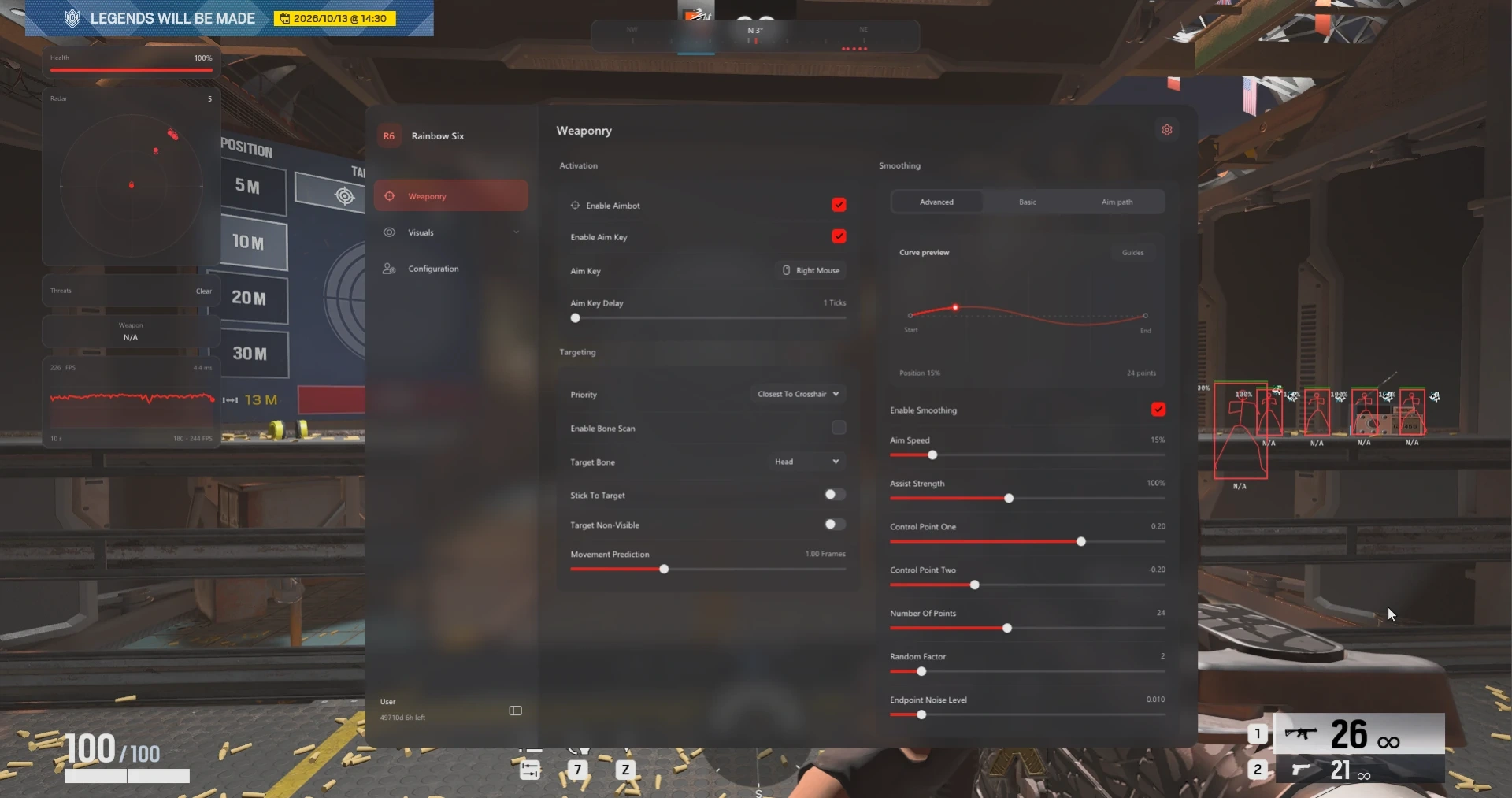
The advanced Aimbot system includes configurable aim keys, activation delay, multiple target priority modes, target bone selection, bone scanning, stick-to-target functionality, movement prediction, non-visible targeting options, adjustable FOV settings, and an ADS FOV multiplier.
Toshi also includes a dedicated Aim Smoothing system with both basic and advanced modes. Users can choose between Smooth, Balanced, and Aggressive profiles while adjusting aim strength, aim speed, assist strength, curve control points, randomisation, endpoint noise, and humanised aiming behaviour. A live smoothing preview and aim-path visualiser provide additional control when tuning settings.
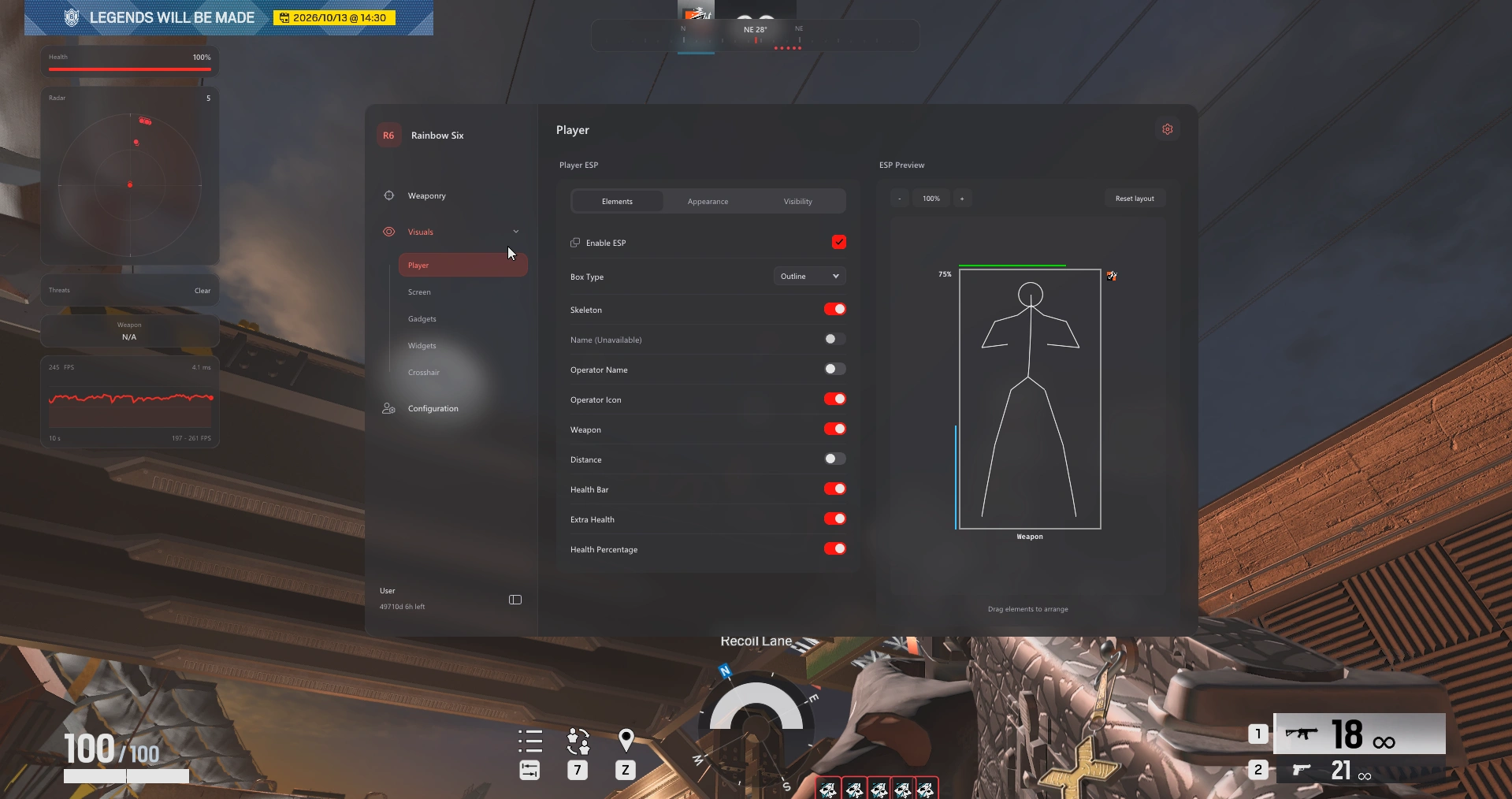
The Player ESP provides extensive visual information including outline, corner, and filled boxes, skeleton ESP, operator names and icons, distance labels, configurable maximum range, team and enemy filters, visibility filtering, weapon labels, health bars, health percentages, and fully customisable colours.
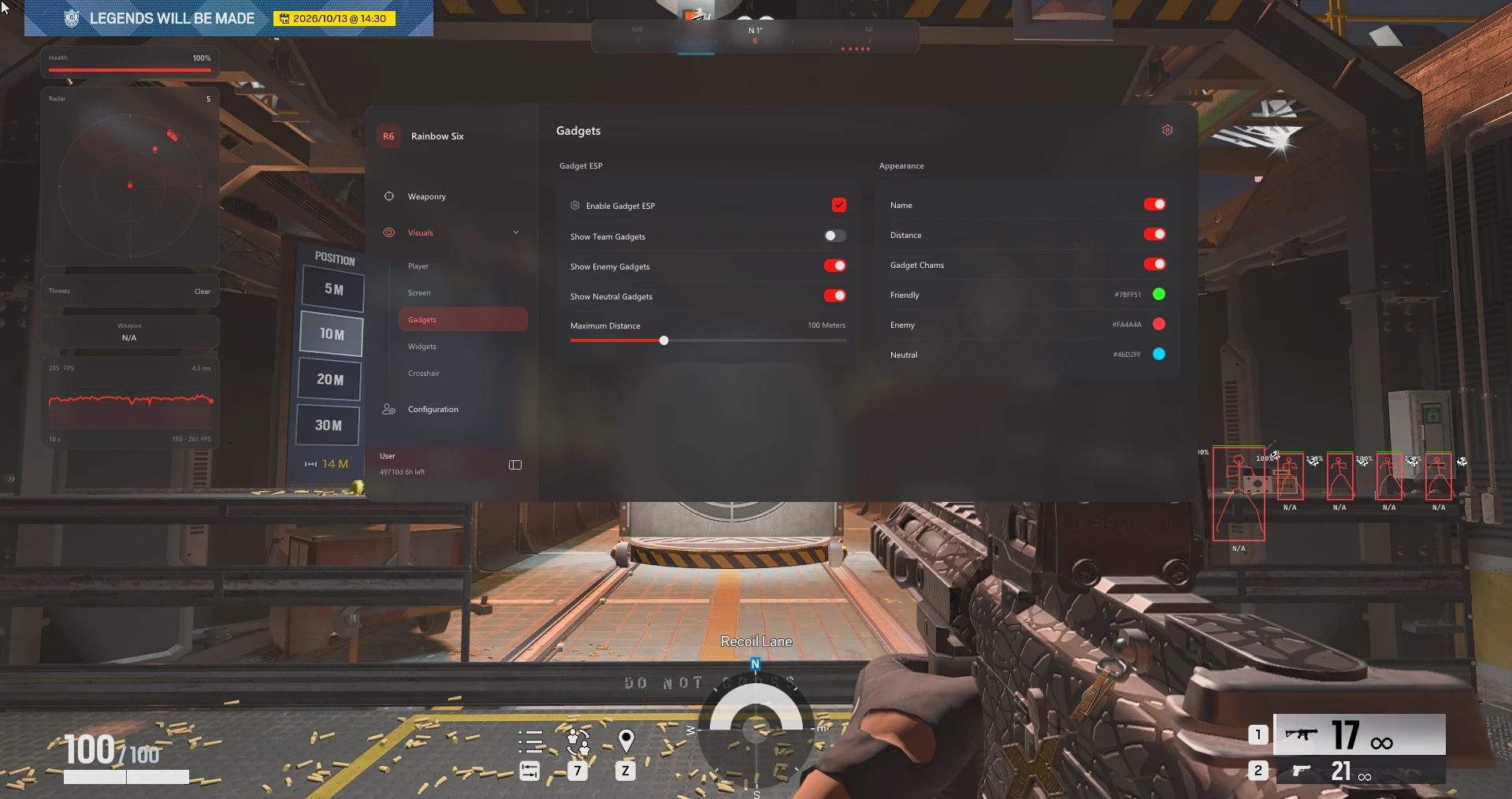
Gadget ESP expands visibility beyond players by displaying supported gadgets with name labels, distance information, configurable range, chams, and separate friendly, enemy, and neutral filters with custom colours.
Toshi includes a full set of Screen Indicators, including configurable snaplines, directional compass tools, off-screen operator indicators, direction arrows, FOV clamping, distance scaling, adjustable icon sizing, and screen padding controls.
The built-in Radar & HUD system offers adjustable radar size and scale, radar blip radius, compass markers, threat warnings, FPS information, frame history, widget opacity controls, weapon name widgets, health bar widgets, and layout reset options.
A dedicated Crosshair Editor provides ten presets alongside a live preview, custom colours, adjustable gap, length, thickness, rotation angle, and constant rotation settings.
To complete the package, the Configs & Interface system allows users to save named configurations, load and browse profiles, delete custom profiles, change appearance themes, select custom accent colours, and scale the interface from 75% to 200%.
With advanced aiming tools, detailed ESP, configurable radar and HUD elements, crosshair customisation, and extensive profile management, Toshi Internal provides a highly customisable feature set for Rainbow Six Siege/X.
Requirements
CPU: Intel / AMD
OS: Windows 10 / 11
Aimbot
Advanced targeting with extensive customization.
Enable Aimbot
Aim Key + Activation Delay
Target Priority: Crosshair, Bone, Distance or FOV
Lowest Health Priority
Target Bone + Bone Scan
Stick to Target
Target Non-Visible
Movement Prediction
Adjustable FOV Circle
ADS FOV Multiplier
Aim Smoothing
Customizable smoothing and aim behavior.
Basic + Advanced Modes
Smooth, Balanced + Aggressive Profiles
Adjustable Aim Strength
Humanized Control
Advanced Aim Speed
Assist Strength
Curve Control Points
Adjustable Point Count
Random Factor + Endpoint Noise
Live Smoothing Preview
Aim Path + Assist Point Visualizer
Path Fade Timing + Color
Player ESP
Detailed player information and visibility options.
Outline, Corner + Filled Boxes
Skeleton ESP
Operator Names + Icons
Distance Labels
Maximum ESP Range
Team, Enemy + Actor Filters
Ignore Non-Visible Players
Friendly, Enemy + Visibility Colors
Adjustable Font Size
ESP Layout Preview
Player Names + Weapon Labels
Health Bar
Extra Health + Percentage
Gadget ESP
Track gadgets with configurable filters and visuals.
Gadget ESP
Friendly, Enemy + Neutral Filters
Gadget Name Labels
Distance Labels
Maximum Range
Gadget Chams
Custom Friendly, Enemy + Neutral Colors
Screen Indicators
Custom directional and off-screen indicators.
Snaplines: Top, Center or Bottom
Adjustable Snapline Thickness
Visibility Filters
Directional Compass
Compass Radius
Clamp to FOV
Distance Scaling
Off-Screen Operator Indicators
Direction Arrows
Adjustable Operator Icon Size
Screen Padding
Radar & HUD
Configurable radar, compass and HUD widgets.
Adjustable Radar Size + Scale
Radar Blip Radius
Compass Bar Width + Range
Player + Team Compass Markers
Threat Warnings
Adjustable Warning Width
FPS Counter
Frame History
Widget Opacity
Layout Reset
Weapon Name Widget
Health Bar Widget
Crosshair Editor
Create and customize your own crosshair.
10 Crosshair Presets
Live Crosshair Preview
Custom Colors
Adjustable Gap
Adjustable Length + Thickness
Rotation Angle
Constant Rotation
Configs & Interface
Save profiles and customize the interface.
Save Named Configs
Load + Browse Profiles
Delete Custom Profiles
Appearance Themes
Custom Accent Color
Interface Scaling from 75%–200%